












A sales rep once told me something that stuck.
“Half my day disappears before the first conversation even begins.”
He wasn’t exaggerating. Between opening a CRM record, checking the number, dialing manually, waiting for the call to connect, logging notes, and repeating the process… minutes vanish. Do that 70–100 times a day and the math becomes painful.
This is exactly the sort of everyday friction most teams quietly accept. And it’s why click to dial has started appearing in more sales floors and support teams over the past few years.
Not because it sounds impressive.
Because it removes one of the smallest — yet most persistent — problems in daily calling workflows.
The Quiet Problem Inside Most Calling Workflows
Manual dialing sounds harmless until you watch it in real time.
An agent finishes a conversation, copies a number, pastes it into the dialer, checks if the country code is correct, hits a call, waits… sometimes misdials… then starts again.
None of this work creates value.
It’s just mechanical effort between conversations.
Inside many contact centers, managers track call durations and response times, but rarely the small gaps between calls. Those gaps add up.
This is where call center software with click-based dialing begins to change the rhythm of the workday.
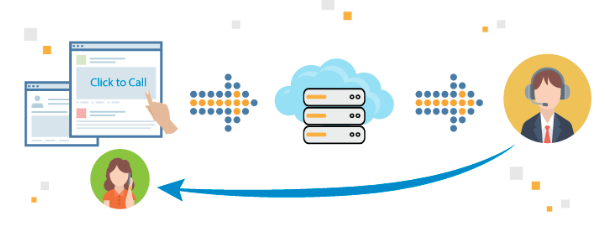
Instead of copying numbers, agents simply click a phone number inside the CRM, helpdesk ticket, or customer profile. The system places the call instantly.
That’s it.
Simple change. Noticeable difference.
Sales Teams Feel the Impact First
Outbound sales teams usually see the benefit almost immediately.
I worked with a B2B SaaS company that had a team of 12 inside sales reps handling follow-ups and demos. Before switching their calling setup, reps were manually dialing from CRM lists.
The manager noticed something odd in the activity reports.
Each rep averaged around 45 calls per day.
After moving to click-based dialing inside their CRM, that number jumped to around 65 calls per day within two weeks.
Nothing else changed.
Same team. Same leads. Same script.
The difference was simply removing the small interruptions between calls.
And here’s the interesting part: the reps didn’t feel more pressured. If anything, they felt less rushed. The process became smoother, which made conversations easier to focus on.
Support Teams Benefit in a Different Way
Customer support teams experience a slightly different advantage.
Picture a support agent handling email tickets. A customer writes back with a complicated issue that would take ten messages to explain.
Instead of typing another long response, the agent clicks the phone number inside the ticket.
The call starts instantly.
No switching systems. No dialing errors. No wasted time.
For teams using modern call center software, the click-to-call function connects directly with customer records. That means call notes, recordings, and interaction history sit in one place.
When another agent picks up the case later, the context is already there.
Anyone who has worked in support knows how valuable that is.
Less Friction Means Better Conversations
One of the underrated benefits of click to dial has nothing to do with technology.
It affects human behavior.
When dialing is easier, agents call more often instead of postponing conversations.
Follow-ups happen faster.
Leads receive quicker responses.
Support issues move toward resolution sooner.
In sales environments, this often leads to a subtle cultural shift. Reps spend less time preparing to call and more time actually talking to prospects.
And that’s where real results happen.
A Small Feature That Fixes Data Problems
Another practical benefit shows up in reporting.
Manual dialing introduces mistakes — wrong numbers, skipped entries, calls that never get logged.
When calls start directly from the system, data becomes more accurate automatically.
Managers get clearer call volumes.
Activity tracking improves.
Follow-ups stop slipping through the cracks.
It’s not glamorous work, but reliable activity data makes coaching and forecasting far easier.
Where Click-to-Dial Makes the Biggest Difference
Some teams see stronger results than others.
From what I’ve observed, the biggest improvements appear in:
Inside sales teams
Reps who make dozens of daily calls gain the most from removing manual dialing.
Customer success follow-ups
Account managers can quickly call customers directly from their profiles.
Support escalation handling
Agents can move complex issues from chat or email to voice without delay.
Lead qualification teams
Faster dialing means more conversations with potential customers each day.
These environments rely heavily on conversation volume. Even small time savings multiply quickly.
What Teams Often Overlook During Implementation
The technology itself is usually simple to install. The real difference comes from how teams use it.
A few things experienced managers pay attention to:
Integrate it with the tools agents already use.
Click-to-call works best when it sits inside the CRM or helpdesk agents open all day.
Encourage quick follow-up habits.
If calling someone takes one click, there’s little reason to delay responses.
Train agents to log short notes immediately after calls.
Context builds quickly when call activity stays connected to the customer record.
These small habits turn a simple feature into a real productivity upgrade.
The Human Side of Faster Dialing
One support manager once described the difference in a way that made perfect sense.
“Before, our agents had to prepare themselves to make a call. Now they just click.”
That tiny psychological shift matters.
When calling becomes frictionless, teams stop overthinking it. Conversations happen naturally instead of feeling like a task that requires effort.
And oddly enough, that tends to improve the quality of those conversations.
Customers hear it. Prospects feel it.
The technology fades into the background — which is exactly where good tools belong.
Most teams don’t notice the time they lose between calls. It’s invisible until the workflow changes.
Then suddenly the day feels lighter. Conversations happen quicker. Agents stay focused.
All because dialing a number no longer takes effort.
Just a click.